A rep isn't showing as complete on a path
Usually one step is still open, such as a lesson the rep never marked done or a play not run to Review. Every reason, and how to check each.
Most often one step is still open. Usually the rep opened a lesson without marking it done, or started a play without running it through to Review. Open the path and look at the rep's line under Who is on it. If it reads, say, 7 of 8, one step is left, and the list below tells you which kinds of step get missed.
This page is for Learning managers. For how a rep finishes each kind of step, see How completion is counted.
What does a step need before it counts?
| Step | Counts as done when |
|---|---|
| Lesson | The rep presses Mark done on it. Opening or reading it isn't enough. |
| Content step (a project, video, PDF or link) | The rep presses Mark done in the path, or has already completed that item anywhere in the workspace. |
| Play | The rep runs it to the Review step. A run abandoned before Review records nothing. |
| Checkpoint | The rep answers every question. Wrong answers count, because it's done once everything is answered, not once they pass. |
| Section | Never counted. Sections are headings. |
A rep can also untick a step with Mark as not done, which takes it off their count again.
How do I work out why they're not complete?
Check these in order.
- Find the open step. Ask the rep to open the path. The room shows N of M done at the top, and every finished step carries a tick. The first step without one is the one to finish.
- Check for a play they abandoned. A play only counts once a run reaches Review. If they left on Answer out loud, nothing was recorded. Ask them to run it again.
- Check for a step you added. Progress is always out of the path's current steps. Add a step after someone finished, and they drop back to, say, 8 of 9.
- Check for a play you published. A play step only counts once its play is published. Publish a play that was sitting in the path as a draft, and it becomes a new step for everyone.
- Check they're still on the path. If the rep isn't in the roster at all, see the next section.
Why isn't the rep on the path at all?
Only people with a learner seat can be on a path. If a rep disappears from the roster, one of these happened:
| Cause | How to check | Fix |
|---|---|---|
| Their learner seat was turned off | Settings → Team: their Learner switch is off | Turn the seat back on. Any path whose rule covers them picks them up again. |
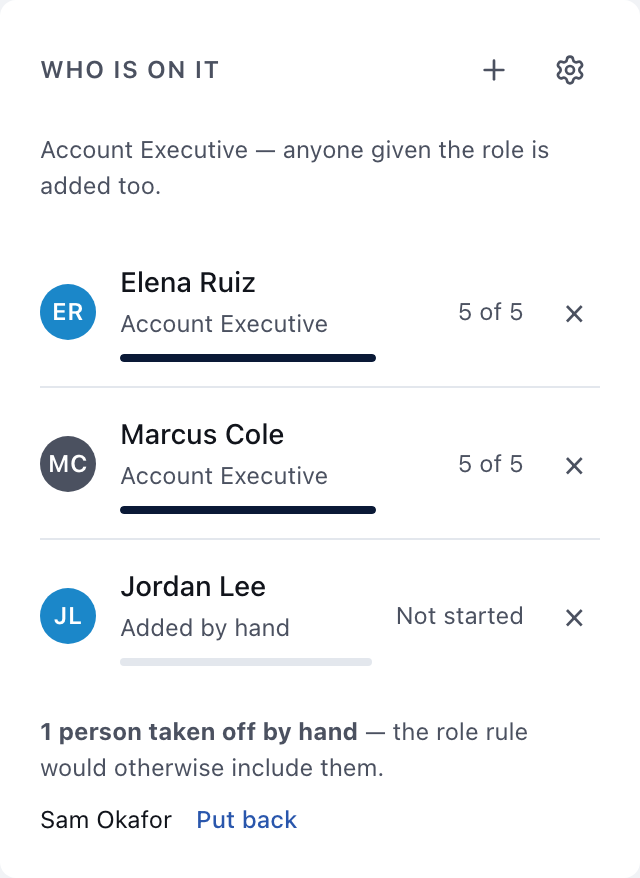
| They were taken off this path by hand | Under the roster: taken off by hand, with their name | Choose Put back. |
| Their job role changed, and the path is assigned By role | Settings → Team: their job role | Change the role back, or add them by hand. |
| They were removed from the workspace | They are missing from Settings → Team | Invite them again. |
Previews never count. Preview as rep and Preview as… record nothing, so walking a path yourself won't move anyone's progress, including your own.
Less likely causes
- A path with no steps is never complete. There's nothing to finish.
- "Complete" isn't "certified." On a path with a certification, finishing every step lets the rep Request sign-off. A manager still has to approve it. See Approving a certification.
- Due dates don't affect completion. A rep who is past a section's date can still finish. Dates are reminders, not gates.
For how assignment rules work, see Assigning a path and Learning managers and learner seats.
This did not answer your question? Email hello@bridgercreative.com.