I can't see Learning in my workspace
Either Sales Academy isn't switched on for your workspace, or you have no learner seat and aren't a Learning manager. How to tell which.
If there's no Learning item in your menu, either Bridger Sales Academy isn't switched on for your workspace, or it is on and you have neither a learner seat nor the Learning manager role. The menu only lists Learning for people who can open it, so both cases look the same there.
Who can use Learning?
You need one of two things, on top of your workspace role:
| You are | You see |
|---|---|
| A Learning manager | Practice, Content, Paths and Activity. Workspace owners and Editors are Learning managers unless they have opted out. |
| A rep with a learner seat | Your paths and Practice. |
| Neither | Nothing. Learning isn't in your menu, and a Learning address opened directly shows Page not found. |
A Member can never be a Learning manager. That switch only exists for Workspace owners and Editors. A Member uses Learning only with a learner seat.
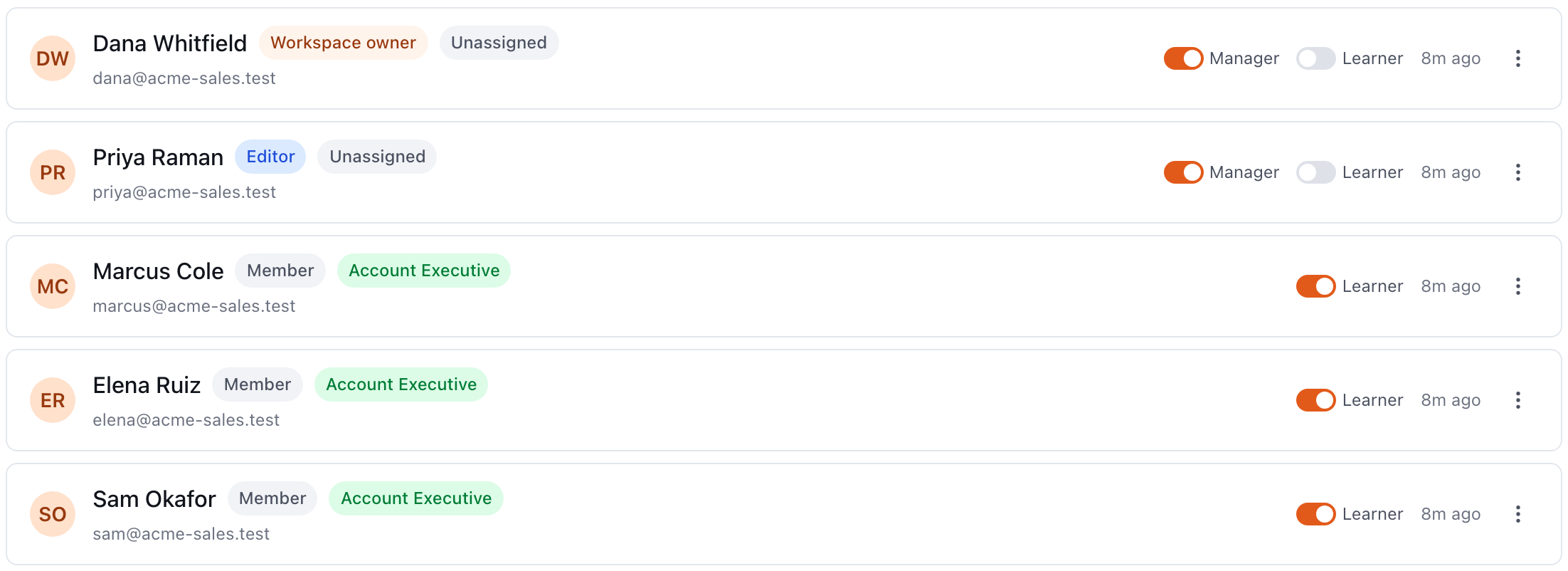
How do I find out which one applies to me?
- Check whether Sales Academy is on. Open Settings → My profile. If the notifications list includes Practice coaching, Sales Academy is on for your workspace and you're missing a seat or the manager role. If it doesn't, Sales Academy is off. Skip to the last step.
- Check your role. Open Settings → My profile. Role & access shows whether you're a Workspace owner, Editor or Member.
- Ask for a seat or the manager role. A Workspace owner can turn on either one for anyone. A Learning manager can give anyone a learner seat. They'll find both switches beside your name in Settings → Team.
- If Learning is off for the workspace, ask Bridger to turn it on, using the Get Help button or your Bridger contact.
I'm an owner or Editor and Learning still isn't in my menu
You've opted out of being a Learning manager, and you don't have a learner seat either. The Manager switch beside your name in Settings → Team turns the role back on.
A Workspace owner can flip that switch for anyone, including themselves. An Editor who has opted out can't switch it back on alone, because only a Learning manager can change their own manager role. Ask a Workspace owner or Bridger to turn it on for you.
Less likely causes
- You're in a different workspace. Learning is set per workspace. If you belong to more than one, check which one you're in. See Switching workspaces.
- Your seat was removed. A Learning manager or Workspace owner may have turned your seat off. That also takes you off every path.
For what each role and seat includes, see Learning managers and learner seats and Roles in your workspace.
This did not answer your question? Email hello@bridgercreative.com.