Who can manage Sales Academy, and who needs a learner seat?
Learning managers build paths and plays and answer coaching; a learner seat is what puts someone on a path and into Practice.
In Bridger Sales Academy, a Learning manager runs the program and a learner seat is what makes someone a rep: only people with a learner seat can be put on a path, run plays from Practice, and count in your team's numbers. The two are separate switches on each person's row in Settings → Team, and one person can have both.
They sit on top of the workspace roles (Workspace owner, Editor, Member), which keep deciding everything outside Learning.
What does a Learning manager do?
A Learning manager sees every Sales Academy tab: Practice, Content, Paths and Activity. From there they can:
- create and publish plays, and add content
- build paths and assign them
- read the team's practice on Activity and receive the Monday digest
- be asked for coaching by a rep, and grade what they send (requests wait at the top of Activity)
- approve or send back a certification
Every Workspace owner and Editor is a Learning manager unless they switch it off. A Member can never be one; their row has no Manager switch.
What does a learner seat do?
A learner seat gives someone their own Learning area: the paths assigned to them and the Practice page where they run plays. Without one, nobody can put that person on a path. Everyone with a learner seat, a job role and a hand-picked name all reach only people who hold a seat.
A Learning manager does not need a seat to manage. They need one only if they also want to be on a path themselves.
For what a seat costs, see Sales Academy pricing. The Team page shows how many seats your workspace has in use.
What happens to someone with neither?
They see no Learning at all. There is no nav item, and every Sales Academy page answers as if it does not exist, the same as a workspace where Bridger has not turned Sales Academy on. That is usually a Member who has not been given a seat. See I can't see Learning.
How do I change someone's seat or manager switch?
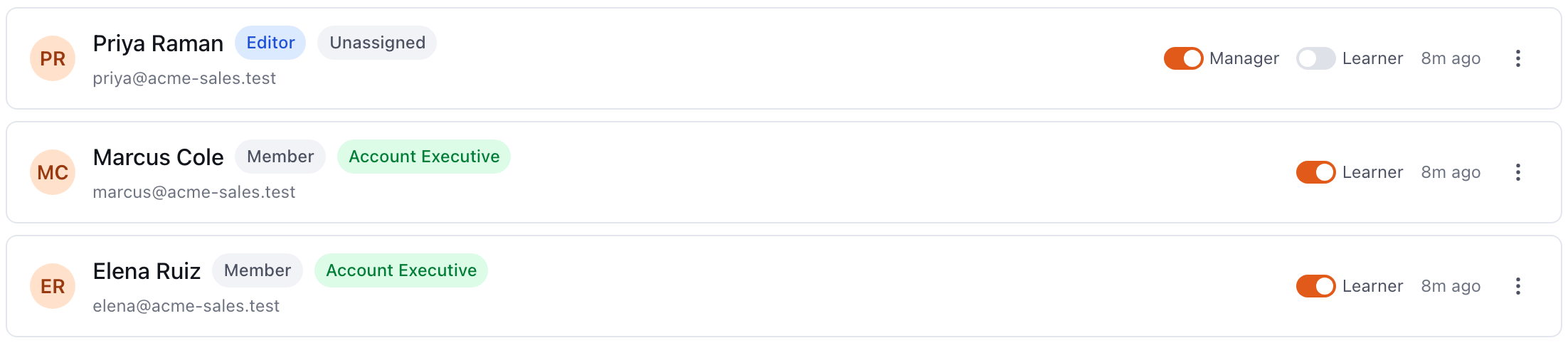
- Open Settings and go to the Team tab.
- Find the person. Their row shows a Manager switch (Workspace owners and Editors only) and a Learner switch.
- Turn the switch on or off. It saves straight away, and the seat count at the top of the page updates.
Who is allowed to change them?
| Who is acting | Learner seats | Manager switch |
|---|---|---|
| Workspace owner | Anyone's | Anyone's |
| Learning manager (not an owner) | Anyone's | Only their own, to step down |
| Anyone else | No | No |
Two limits apply to everyone:
- Someone has to manage Learning. The last Learning manager in a workspace cannot switch themselves off. The portal says "Someone has to manage Learning. Make another person a Learning manager first."
- An Editor who steps down cannot step back up on their own. Once they are not a Learning manager, only a Workspace owner can turn the switch back on.
Changing someone's workspace role also changes this. An Editor moved to Member stops being a Learning manager, because Members never are.
Does inviting someone give them a seat?
No. An invitation sets the person's permission and, when Sales Academy is on, their job role. The learner seat is a separate switch you turn on from their row afterwards. See Inviting a teammate.
Related
- Roles in your workspace
- How do I assign a path to my team?
- Getting started with Sales Academy, the rep's view
This did not answer your question? Email hello@bridgercreative.com.