How do I create and publish a play?
Choose New, then Play, pick a pattern, write the situation, the challenge and the checks, then press Publish. Only someone on your team can publish.
A play in Bridger Sales Academy is a situation a rep runs out loud, with what a good answer covers. To make one, choose New → Play, give it a title and a pattern, fill in the editor, and press Publish. A play starts as a draft that reps cannot see, and only a Learning manager on your team can publish it. Bridger can draft plays for you but never publishes them.
How do I start a play?
- In Learning, choose New → Play.
- Enter a Title.
- Choose a Pattern: Opener, Discovery, Objection or Positioning. Each one sets up two sections of checks with their headings; you write the checks yourself.
- Press Create draft. The play editor opens.
What goes in the editor?
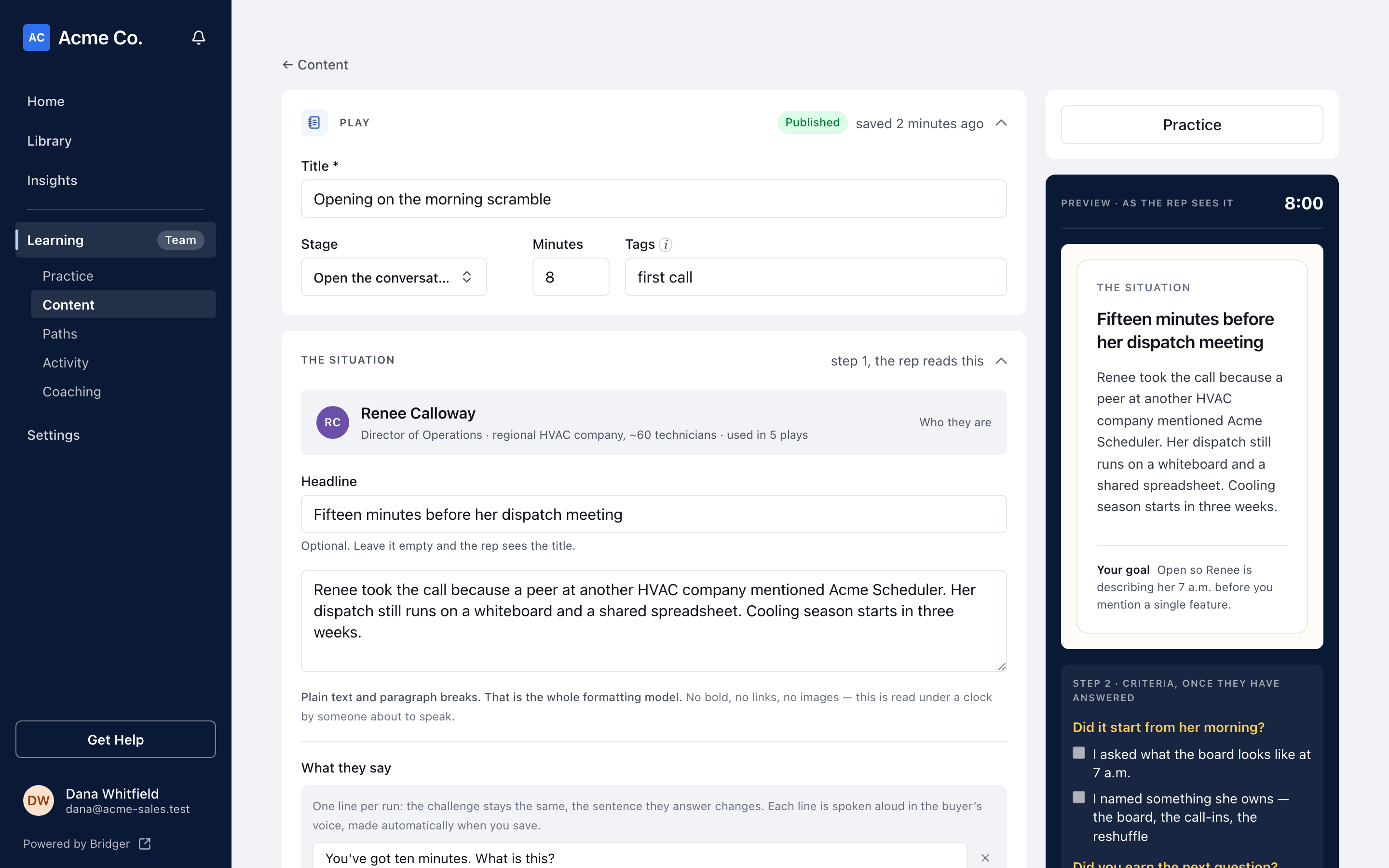
The editor follows the order a rep meets things in. Every field saves when you click out of it; there is no Save button.
| Section | What you write | What the rep sees |
|---|---|---|
| Play | Title, Stage, Minutes, Tags | Where it sits on Practice and how long it takes |
| The situation | An optional Headline, then the scene in plain text | Step 1, read before they answer |
| What they say | One or more lines the buyer says, one per run | A different line each run; each is spoken aloud in the buyer's voice, made automatically when you save |
| The challenge | One question | Stays on screen while they answer |
| A strong answer | A model answer | Behind the reveal, after they answer |
| Coach's tip | A note for managers | Never shown to reps |
| What a good answer covers | Sections of checks, each check in the rep's first person, with an optional "why" | Hidden until they have answered, then used to grade themselves |
| Recommended resources | Content from your Content list | Shown with the play so reps can open it |
The situation is plain text and paragraph breaks only. Keep checks to six or fewer per play; the editor counts them and warns you past six, because reps tick them from memory on a phone.
The buyer in the situation comes from Bridger and is read-only here.
What does a play need before I can publish it?
Publish checks for six things, and under the button the editor says what is still missing ("To publish, add …"):
- a title
- a stage
- the situation
- the challenge
- at least one check
- a name for every section that has checks in it
A play with no stage cannot be published because reps find plays by stage on their Practice page.
How do I try a play before reps see it?
Press Practice in the editor's sidebar. On a draft, this runs the play as a preview that records nothing: no run, no completion, and nothing in Activity or the Monday digest. On a published play it is an ordinary run.
The Practice tab also shows your drafts in place, marked "Draft · not visible to reps", so you can see where a play will appear before you publish it. To see Practice exactly as a rep does, use Preview as… and pick a rep, or A new rep: everything.
What happens when I publish?
The play's status changes to Published and reps can run it from its stage on Practice and from any path it is a step on. Nobody is notified.
To take a play back, open the menu on its row in Content and choose Unpublish. It goes back to Draft and reps stop seeing it; nothing is deleted. A path that includes it keeps the step, marked Play · unpublished, reps can't run this, and that step stops counting toward the path.
Remove on the same menu deletes the play from Learning. It cannot be undone.
Can Bridger write plays for us?
Yes. Use Share material on the Practice tab to send Bridger decks, call notes or battlecards. Bridger drafts plays from them, and the drafts appear for you to review. While the first plays are being prepared, Practice says "Bridger is drafting your plays." Bridger cannot publish; someone on your team reviews each draft and presses Publish.
Related
This did not answer your question? Email hello@bridgercreative.com.