How does a practice play work?
A play is a sales situation you answer out loud in three steps — read the situation, answer, then review yourself against a strong answer. It counts once you reach Review.
A play is a situation from a real sale — a buyer, what they just said, and what a good answer covers. You run it in three steps: Read the situation, Answer out loud, then Review, where you grade yourself against a strong answer. The play counts as practiced the moment you reach Review.
How do I start a play?
There are three ways in:
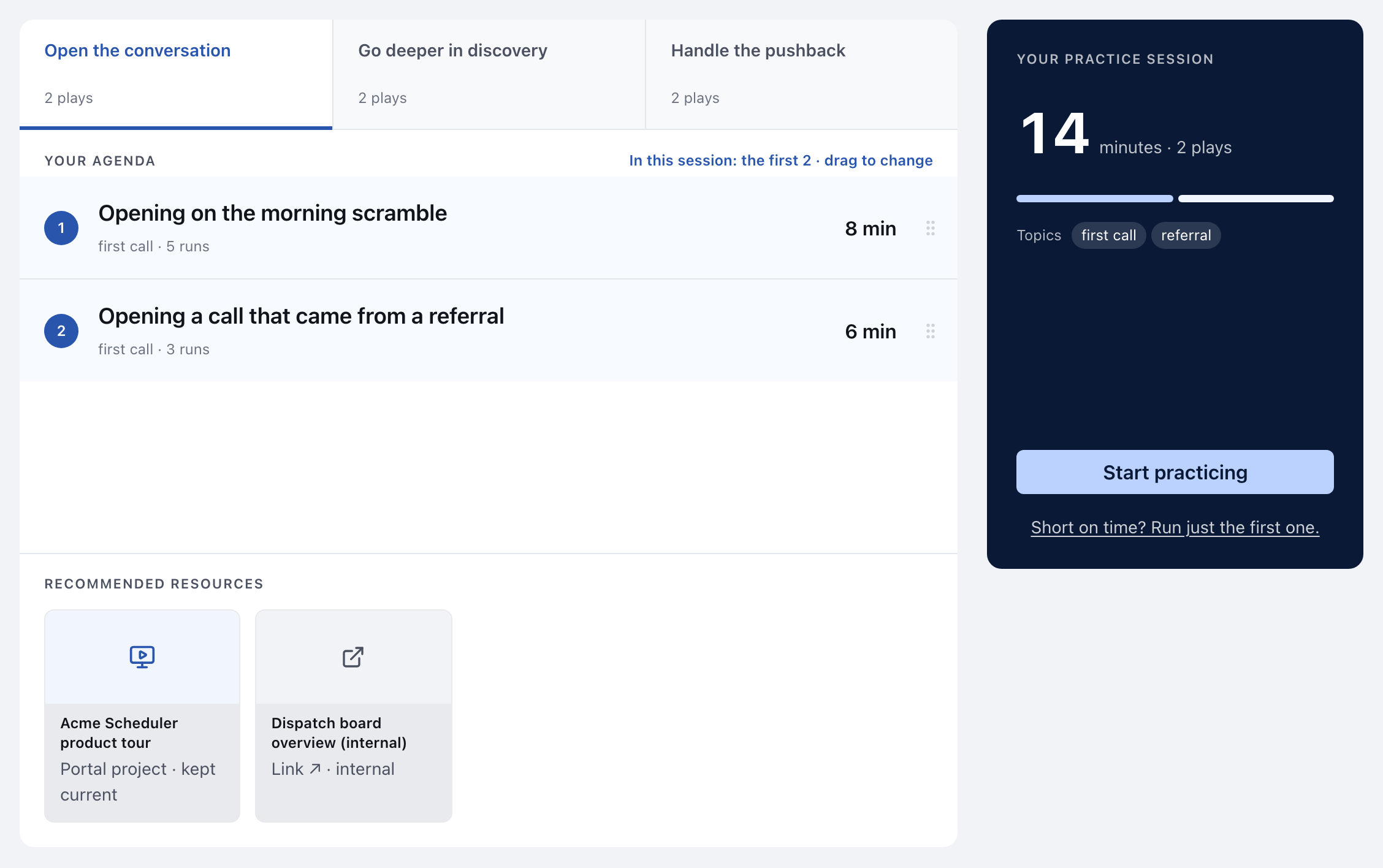
- A practice session. On the Practice page under Sales stages, pick a stage. Its plays become Your agenda: plays you have never run come first, then the ones you ran longest ago, easier plays before harder ones. Click Start practicing to run the first three. Drag rows to change which three; your order lasts for today and is not saved.
- Just one. Click Short on time? Run just the first one. and then Run one.
- From a path. Click Practice it on a play step. When you finish, you come back to the path.
The panel beside the agenda shows how many minutes the session takes, how many plays it holds, and the topics they cover.
What happens on each step?
1. Read the situation. You see The situation, the buyer's line and Your goal. Click the buyer's name to open their card. When a recorded voice is available, a button like Hear Dana say it plays the buyer saying the line; without one, there is no button. If the play has more than one line, the Try another button swaps in a different one.
2. Answer out loud. Say your answer as if the buyer were in front of you. You can record yourself with Start recording: nothing records until you press it, and the recording stays on your device. See Where are my practice recordings stored?. If the microphone is blocked, missing or in use by another app, the tile says which; see My practice recording won't start. If you are stuck, Show a strong answer reveals one. It is optional, and opening it while you are recording ends the take, so the model answer never ends up in your recording.
3. Review. Grade yourself against the play's checks and the strong answer, and decide whether you would say it again. See How do I grade my own practice?. Review also lists What this play points at: the decks, links and customer stories worth sending or citing.
What do the buttons in the top bar do?
| Button | Does |
|---|---|
| Next | Moves from the situation to your answer |
| I’ve answered | Moves to Review. This is the moment the play counts. |
| Continue — play 2 of 3 | Moves to the next play in your session |
| Finish session | Ends the session and takes you back where you started |
| Back | Returns to the previous step, or the previous play's review |
| Leave | Shown on the very first step. Leaves without recording anything. |
The step list on the left lets you go back to a step you have already seen. View full play opens the whole play as a document in a new tab.
What is the clock for?
The clock counts down the play's suggested length (ten minutes when the author did not set one) and turns to a warning color in the last minute. It is a guide. Nothing happens when it runs out, and you can take as long as you need.
When does a play count?
When you reach Review. That records a run: which play, when, and how long it took. Leaving earlier records nothing. Run it again starts a fresh run, and Review tells you which attempt this is, like 3rd run.
If the play is a step on one of your paths, your first run completes that step, wherever you ran it from.
The run record holds nothing about how you graded yourself, and it does not hold your recording.
What is "Was this play any good?"
A thumbs up or down on the play itself, at the bottom of Review. It says About the play, not you. A thumbs down asks what would make it better: Unrealistic situation, Not what I would say, Too easy or Took too long. The play's content owner sees these answers without your name, and your manager does not. Your answer is sent once, when you leave Review, and cannot be changed after that.
This did not answer your question? Email hello@bridgercreative.com.