I didn't get my sign-in code
The code is usually in spam or quarantine. If not, the address may not be invited, or a newer request replaced it. Check these in order.
Most of the time the code did arrive and is sitting in your spam, junk or quarantine folder, so search your mail for Your sign-in code from bridger@auth.bridgercreative.com before asking for another one. If it is not there, the address you typed is probably not the one you were invited on. The portal is invite-only, and an address that hasn't been invited gets no code at all.
What should I check first?
Work down this list. Each step rules out one cause.
- Check spam, junk and quarantine. Search for the subject Your sign-in code. Company mail filters sometimes hold a message from a sender they haven't seen before. If yours has a quarantine portal, look there too, or ask IT to release it.
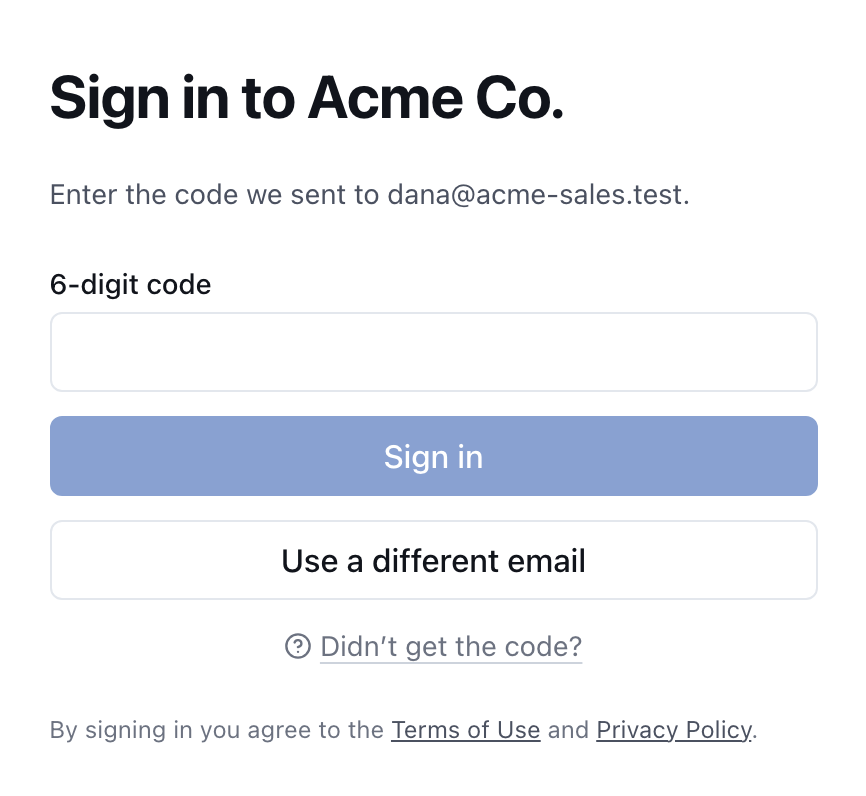
- Check the address on screen. After you ask for a code, the page says Enter the code we sent to followed by your address. If it's wrong, choose Use a different email and type it again.
- Use the address you were invited on. The portal only sends codes to invited addresses. If your company has more than one domain, or you were invited on a personal address, try that one.
- Wait a minute, then ask once more. Choose Use a different email, type your address and choose Send code. If you ask again too quickly, the request can be refused. Each new code replaces the one before it, so use only the newest email.
- Ask whoever invited you. If nothing arrives after that, your Workspace owner or your Bridger contact can check that you're on the team and send the invite again.
Why does the page say a code was sent when it wasn't?
The sign-in page looks the same whether or not the address has an account. That's deliberate: the page won't confirm to a stranger which addresses can sign in. So Enter the code we sent to only means your request went through. It doesn't confirm that a code went out.
If the address isn't invited, no code is sent. You might get a separate email titled About your Bridger sign-in, explaining that access is invite-only and asking you to contact your Bridger account manager or your Workspace owner. That email isn't always sent, though, so don't take its absence to mean your address is invited.
I have an invite email. Do I still need to send a code?
No. The invite email already contains a 6-digit code. Go to the address in the email, choose I already have a code if the page is asking for your email, and type your email address and the code.
Don't choose Send code while you're holding an invite code. Sending a new code replaces the one in your invite, so the invite code stops working.
The invite code lasts one hour. If the hour has passed, type your email on the same page and send yourself a new code. You don't need a new invite. See My sign-in code says it's invalid or expired.
Less likely causes
| What you notice | What it usually means |
|---|---|
| Nothing in any folder, ever, from any Bridger email | Your company's mail system is blocking the sender before it reaches you. Ask IT to allow bridger@auth.bridgercreative.com. |
| A code arrived, but the page then says your account isn't connected to a workspace | You can sign in, but you have been removed from every workspace. Ask your Workspace owner or Bridger contact to add you back. |
| You see a Continue with Google button | You're on the Bridger team's sign-in page. Client workspaces use email codes only. Go to your workspace's own address instead. |
For a walkthrough of the normal sign-in flow, see Signing in.
This did not answer your question? Email hello@bridgercreative.com.