How do I switch between workspaces?
Open the menu under your name and pick a workspace under Switch workspace. One sign-in covers every workspace you belong to.
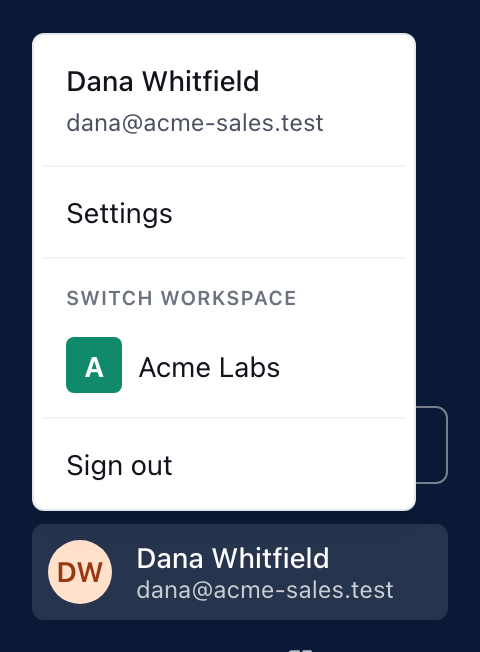
To switch workspaces, choose your name at the bottom of the sidebar and pick the workspace you want under Switch workspace. You stay signed in: one sign-in covers every workspace your email address has been invited to.
The Switch workspace section appears only when you belong to more than one workspace. If you belong to one, there is nothing to switch to.
How do I switch on a computer?
- Choose your name and email at the bottom of the sidebar.
- Under Switch workspace, choose the workspace's name.
- That workspace's Home opens, in its own branding.
How do I switch on a phone?
The phone layout has no account menu, so use an address instead:
- Go to
app.bridgercreative.com. When you belong to more than one workspace, it opens Choose a workspace, a list of every workspace you can open. - Or go straight to the other workspace's own address, such as
app.bridgercreative.com/acme.
What is the Choose a workspace page?
It is where you land after signing in from app.bridgercreative.com/login when you belong to more than one workspace. It says how many workspaces you have access to and lists each one with its logo and address. Signing in from a workspace's own address skips it and takes you straight into that workspace.
What changes when I switch?
| Changes per workspace | Stays the same everywhere |
|---|---|
| Your role — Workspace owner, Editor or Member — is set separately in each | Your sign-in: no new code needed to switch |
| Presentations, Insights, team and shared channels | Your email preferences in Settings → My profile, which apply to every workspace you belong to |
| Whether Learning is switched on, and your Learning access | Your name, photo and contact details |
| The branding of the sidebar and sign-in page |
Being a Workspace owner in one workspace gives you nothing in another. See What can each workspace role do?
Why was I sent somewhere else when I opened a workspace address?
If you open the address of a workspace you have not been invited to, the portal sends you to Choose a workspace — or, if you belong to only one, straight to your own workspace. Ask that workspace's owner or Editor to invite your email address. See How do I invite, re-invite or remove a teammate?
This did not answer your question? Email hello@bridgercreative.com.