How do I make a path certify reps?
Turn on the Certification tile in the path builder, then choose a checkpoint pass mark, an optional recorded roleplay, and how long it stays valid.
To make a path certify reps in Bridger Sales Academy, open the path in the builder and turn on the Certification tile in the right-hand column. A rep is then certified once they have done every step, met any pass mark and roleplay you set, and a Learning manager has signed off. Certification is off on every path until you turn it on, and each change in the tile saves straight away.
What does a certification require?
The tile lists one line per requirement. Two are always on; three are yours to set.
| Requirement | Setting | What it means |
|---|---|---|
| Every step done | Always | Every lesson, play and checkpoint on the path is done |
| Checkpoint pass mark | None, 70%, 80%, 90% or 100% | The rep's best score on each checkpoint must reach it. Retakes are allowed, and every attempt is kept |
| Recorded roleplay | Off, or one published play | The rep records one take of that play and sends it to a Learning manager, who says whether it meets the standard |
| Manager sign-off | Always | A Learning manager approves; their name and the time go on the record |
| Valid for | No expiry, 6, 12 or 24 months | How long the certification lasts from the day it is approved |
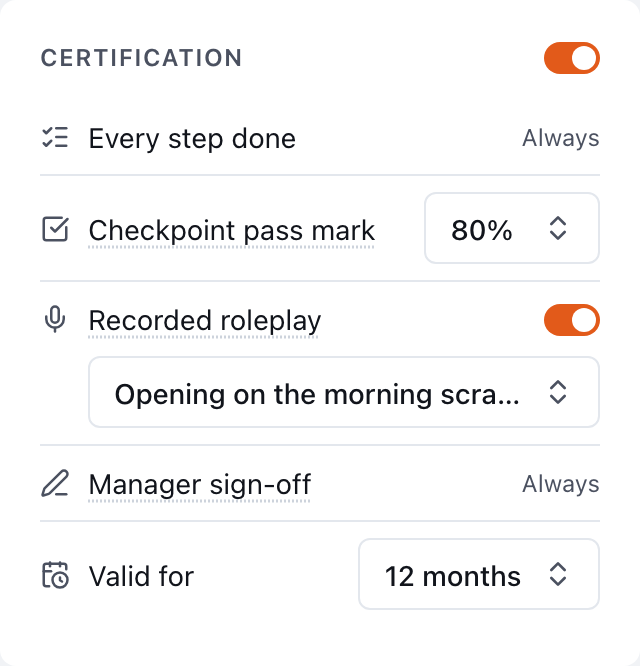
How do I turn it on?
- In Learning → Paths, open the path.
- In the right-hand column, switch on Certification.
- Choose a Checkpoint pass mark, or leave it at None.
- To ask for a recorded take, switch on Recorded roleplay and choose the play.
- Choose how long it is Valid for.
A pass mark only applies when the path has at least one checkpoint. On a path without checkpoints it is ignored, and the tile says This path has no checkpoints yet, so the pass mark does not apply. See How do I build a learning path? for adding one.
The roleplay can be any published play in your workspace, not only one on this path. If Recorded roleplay cannot be switched on, the tile says "Publish a play to ask for a recorded take."
Who signs off?
If you chose a person under Who reps ask on this path, and they are a Learning manager, the sign-off request goes to them alone. Otherwise it goes to every Learning manager in the workspace. Either way, any Learning manager other than the rep can make the decision. Bridger cannot sign off a certification for you.
What do reps see?
On a certifying path, a rep's room shows each requirement with where they stand: steps done, their best checkpoint score, the state of their roleplay take, and the sign-off. When everything above the sign-off is met, they can press Request sign-off. See Earning a certification.
Where do I follow certifications?
Once the setting is on, a Certification section appears under the steps in the builder. It holds:
- each request waiting on a decision, with the evidence it was made on
- the team on the path, each marked Certified, Expiring (30 days or less left), Expired, Awaiting sign-off, Sent back, In progress or Not started
- Certificate beside anyone certified, and Export CSV for the whole list
If nobody is on the path yet, the section says to assign it first.
Can I change the requirements later?
Yes. A changed setting applies to requests from then on. Certifications already approved keep the record they were approved on: each certificate says which date the path's content was current as of, and approving never edits an earlier record. When a certification expires, the rep can request sign-off again.
How long is a roleplay recording kept?
A certification take is kept while its request is pending or the certification it supports is still valid. After that, it is deleted 90 days after it was sent.
Related
- How do I approve or send back a certification?
- How do I review a rep's coaching request?
- Taking a checkpoint
This did not answer your question? Email hello@bridgercreative.com.