How do I get certified on a path?
Finish every step, meet any checkpoint pass mark and recorded roleplay the path asks for, then click Request sign-off. A Learning manager approves it and you get a certificate.
On a path that offers certification, a Certification card sits below the last step and lists what it takes. Finish every step, meet the checkpoint pass mark and recorded roleplay if the path asks for them, then click Request sign-off. When a Learning manager approves it, the card says Certified and links to your certificate.
Not every path certifies. If there is no Certification card at the bottom of your path, it does not.
What does it take?
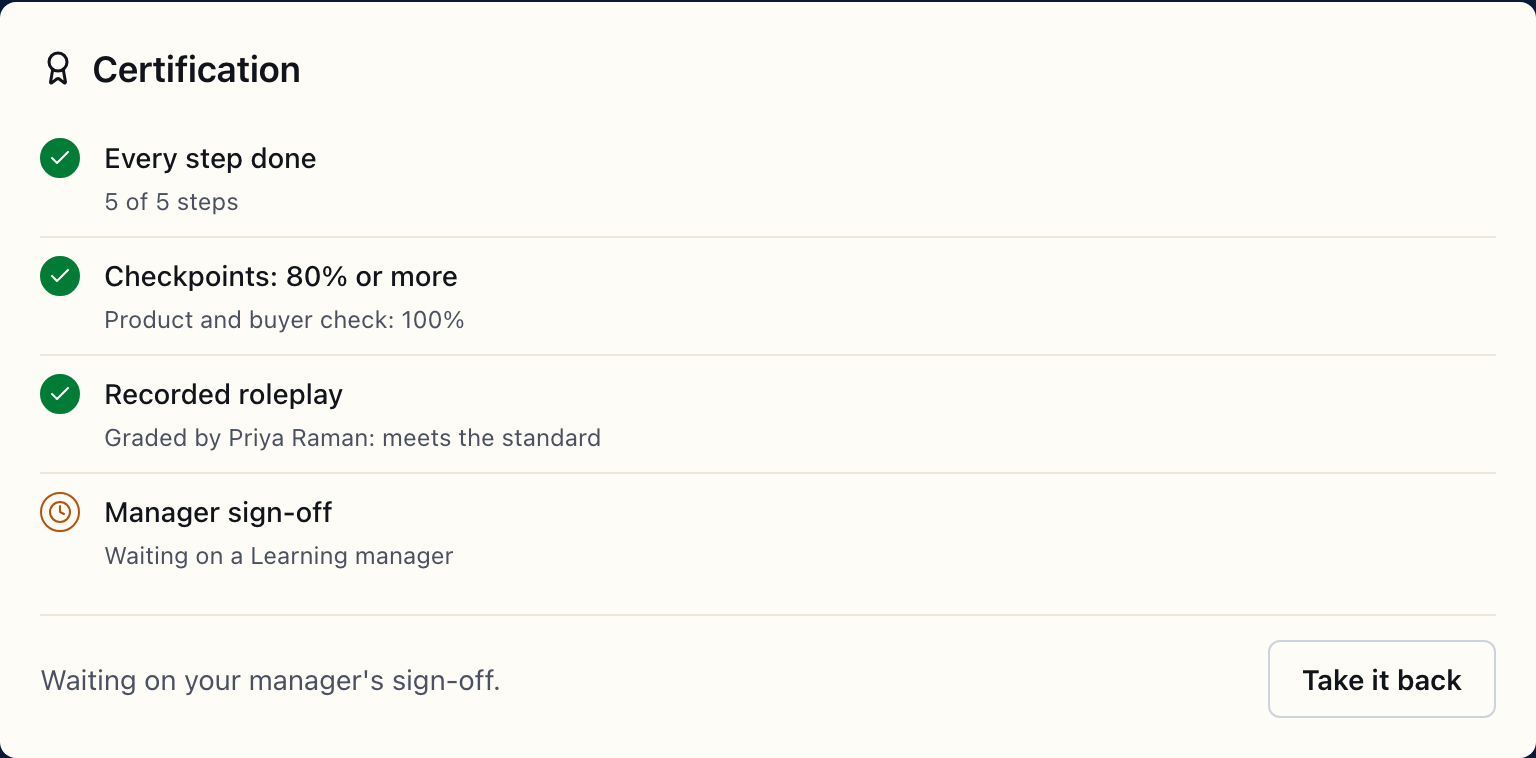
The card lists the requirements for your path. There can be up to four:
| Requirement | Met when |
|---|---|
| Every step done | Every step on the path is complete. The card counts them, like 9 of 12 steps. |
| Checkpoints: 80% or more (or whatever the mark is) | Your best finished try on each checkpoint reaches the mark. Only on paths with a pass mark. |
| Recorded roleplay | A manager grades your take of one named play as meeting the standard. Only on paths that ask for it. |
| Manager sign-off | A Learning manager approves your request. Always last. |
Each requirement shows a tick when it is met, a clock while it is waiting on someone, and a short line saying where you are.
How do I record the roleplay?
- On the Certification card, click Record your take. It opens the play the path names.
- Run the play and press Start recording on Answer out loud.
- On Review, pick Keeper (or Not yet), then click Send for certification.
- Choose the manager who should hear it under Coach and click Send. The dialog says your coach will decide whether it meets the standard for this path.
The card then reads Take sent to Jordan Lee, waiting to be graded, and until it is graded the card's last line says Your roleplay take is with your coach. Once they grade it, you can request sign-off. The manager marks each of the play's checks and answers whether it meets the standard. If they say not yet, the card says Graded: not yet. Record a new take; record another and send it the same way.
Start from Record your take on the card. Running the same play from anywhere else offers Ask for coaching instead, which sends an ordinary coaching request that does not count toward certification.
Once sent, a certification take cannot be withdrawn. How it is kept is under Where are my practice recordings stored?.
How do I ask for sign-off?
When everything above Manager sign-off is met, the card says Everything is done. Send it to your manager to sign off. Click Request sign-off.
The request goes by email to the person your manager named for the path, or, if nobody is named, to every Learning manager on your team. Any Learning manager can decide it, but never you. Your request carries the evidence: your steps, your checkpoint scores, and the roleplay verdict.
While you wait, the card says Waiting on your manager's sign-off. Changed your mind? Take it back withdraws the request, and you can send it again later.
What happens when they decide?
You get an email either way, as long as Practice coaching is on in your notification settings.
- Approved. The card shows Certified and Approved by …, valid until …, with View certificate. If your workspace posts Learning activity to a team channel, the channel hears about it.
- Sent back. The sign-off line shows Sent back with the manager's note. Fix what they asked about and click Request sign-off again. A request sent back is not announced to the team channel.
What is on the certificate?
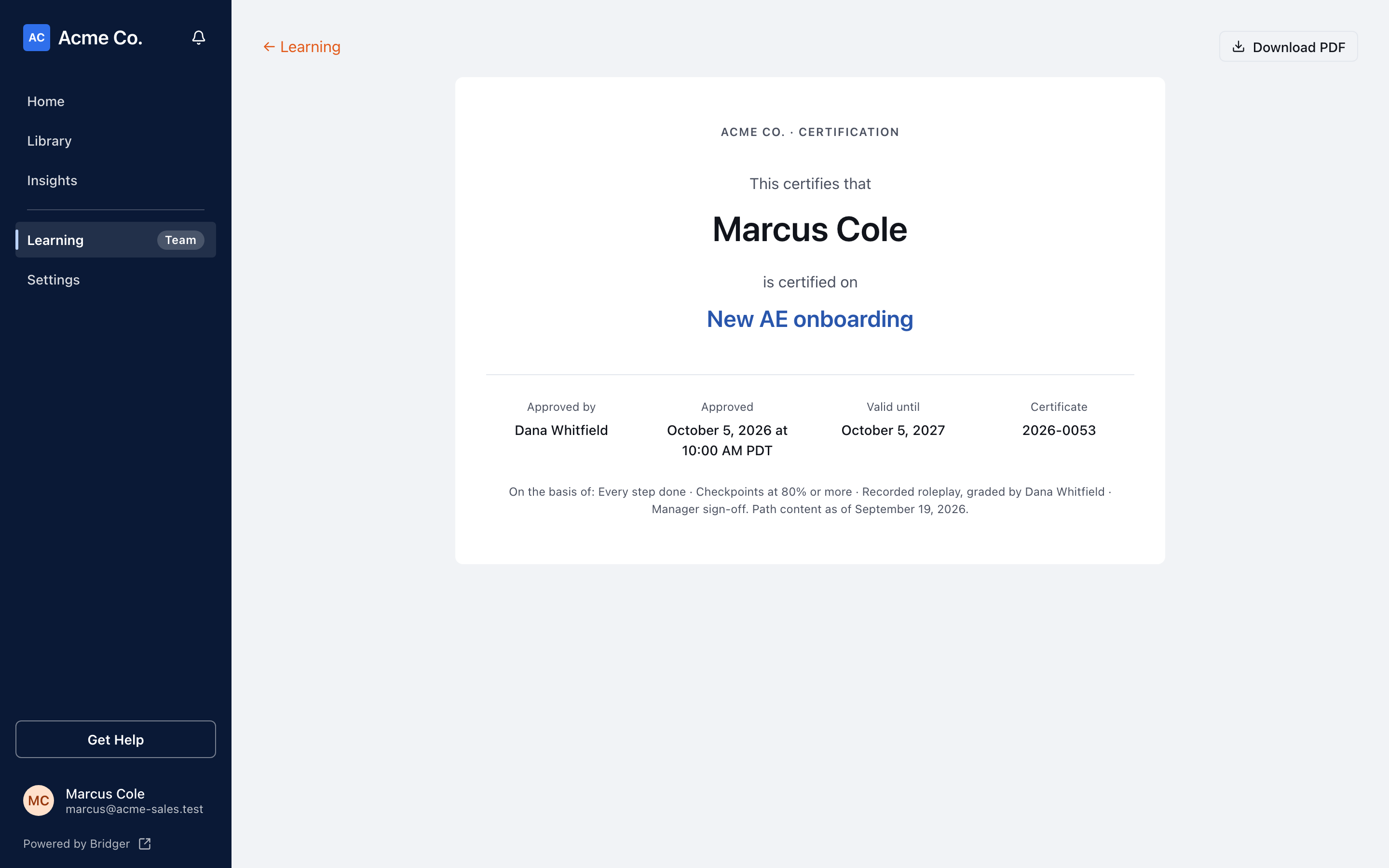
Click View certificate. It shows:
- Your name and the path.
- Approved by, the date and time it was Approved, and Valid until (or No expiry).
- A Certificate number, the year it was approved and a serial, like 2026-0001.
- What it was based on, and Path content as of the date the path was last updated before your request.
Click Download PDF and choose to save as PDF in your browser's print dialog. You, your workspace's Learning managers and the Bridger team can open the certificate.
Does a certification expire?
It depends on the path. A manager sets it to last 6, 12 or 24 months, or to have no expiry. The card and the certificate show the date.
After it lapses you are no longer certified on the path. Request sign-off again once the requirements are met; a new approval makes a new certificate rather than editing the old one.
This did not answer your question? Email hello@bridgercreative.com.