How do I see how my team is practicing?
The Activity tab shows coaching waiting on you, plays run weekly, who is practicing, each rep's runs and opens, and content gaps. A digest arrives each Monday.
The Activity tab in Bridger Sales Academy shows how your team is practicing: plays run each week for the last ten weeks, how many reps practiced this week, a row per person with their runs and opens, and one list of content gaps worth fixing. Every Monday, Learning managers also get the same picture as a three-line email, the Monday digest.
When reps have asked you for coaching, Waiting for your coaching sits at the top of Activity, above everything else. See How do I review a rep's coaching request?
Activity is for Learning managers only. In the practice counts (Sales plays per week, Practicing and the digest), your team means the people with a learner seat; a manager without a seat is not counted, because they cannot practice. The Your team table lists everyone in the workspace.
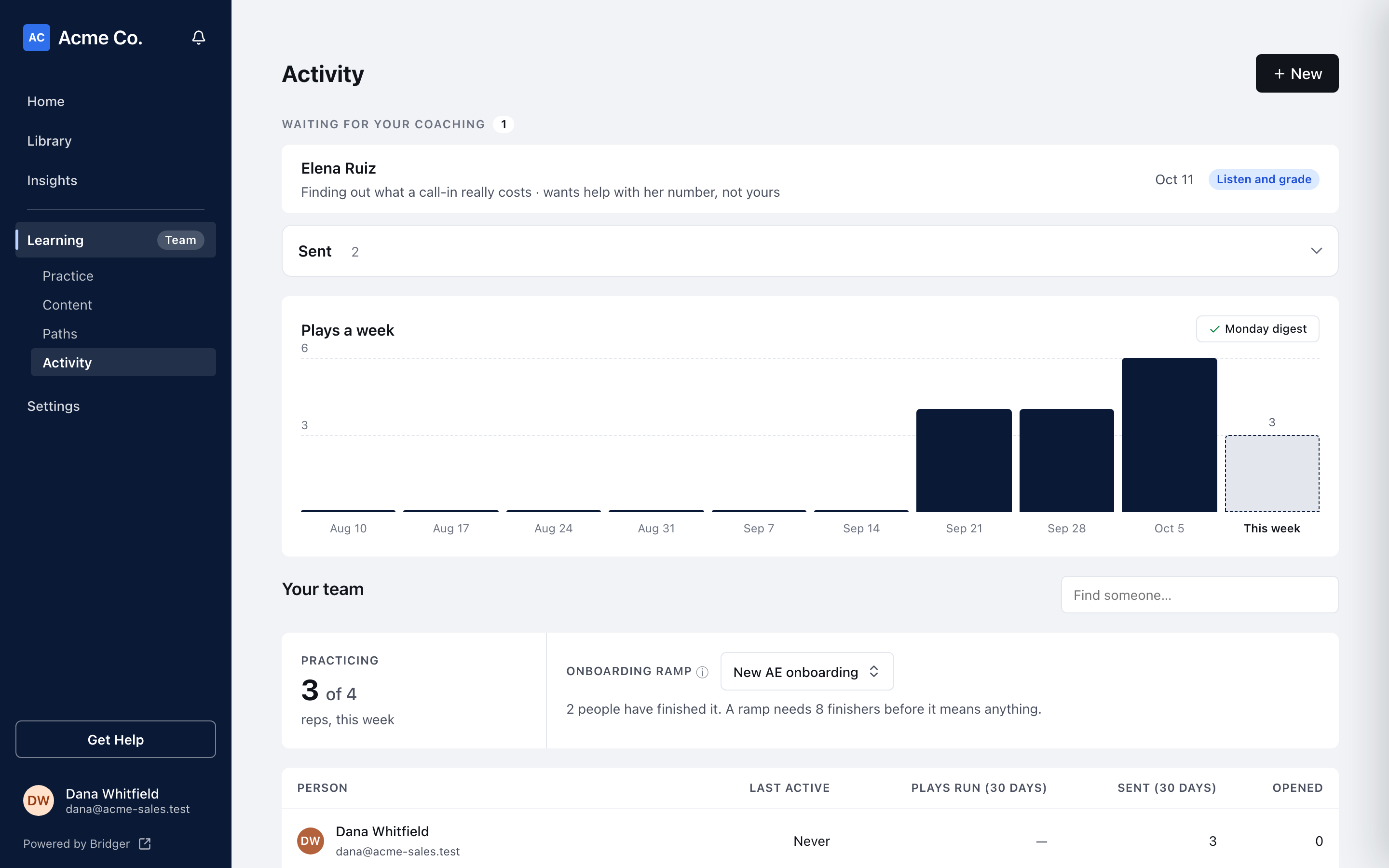
What does each part of Activity show?
| Part | What it shows |
|---|---|
| Waiting for your coaching | Coaching requests reps sent to you, with ones you have answered folded under Feedback sent. A request opens in a window over Activity. Shown only when someone has asked you |
| Sales plays per week | Plays run in each of the last ten weeks. Point at a bar for how many plays came from how many reps |
| Practicing | How many of your learners ran at least one play this week ("reps, this week") |
| Onboarding ramp | For a path you choose: days from being put on it to finishing it, for the first 3 and the last 5 people to finish. It needs 8 finishers before it shows bars |
| Your team | A row per Person: Last active, Plays run (30 days) (and how many different plays), Sent (30 days) when it applies, and Opened, the number of different items they have opened. Use Find someone… to search |
| Content gaps worth fixing | One list of what in your content needs attention, with how many plays your team ran in the last 30 days beside the heading. See below |
| What reps are sharing | Links your team sent in the last 30 days, and how often they were opened |
Weeks run Monday to Sunday, in UTC. A rep who has left drops out of every number, so each bar is counted against today's team.
What do I see when I open one rep?
Choose a rep's name in Your team to open their panel:
- Assigned paths: each path with steps done and Completed, In progress or Not started.
- Recent runs: each play they ran, when, whether solo or with someone, and what they picked as hardest that time.
- Content opened: what they opened from Sales Academy.
The panel never shows how a rep graded themselves; that stays on their device. It is for participation, not scoring.
What is in Content gaps worth fixing?
Each row says what is wrong and carries the one thing to do about it, strongest signal first:
| Row | What it means | Action |
|---|---|---|
| A play reps skipped | Reps said it was not worth their time, with how many said so and the reason given most | Review |
| … is the thinnest stage | The sales stage with the fewest plays covering it, and when one was last run | Ask Bridger for a play |
| A play with no deck | It links only outside Portal (the sites are named), or it points at nothing a rep could send | Add a deck |
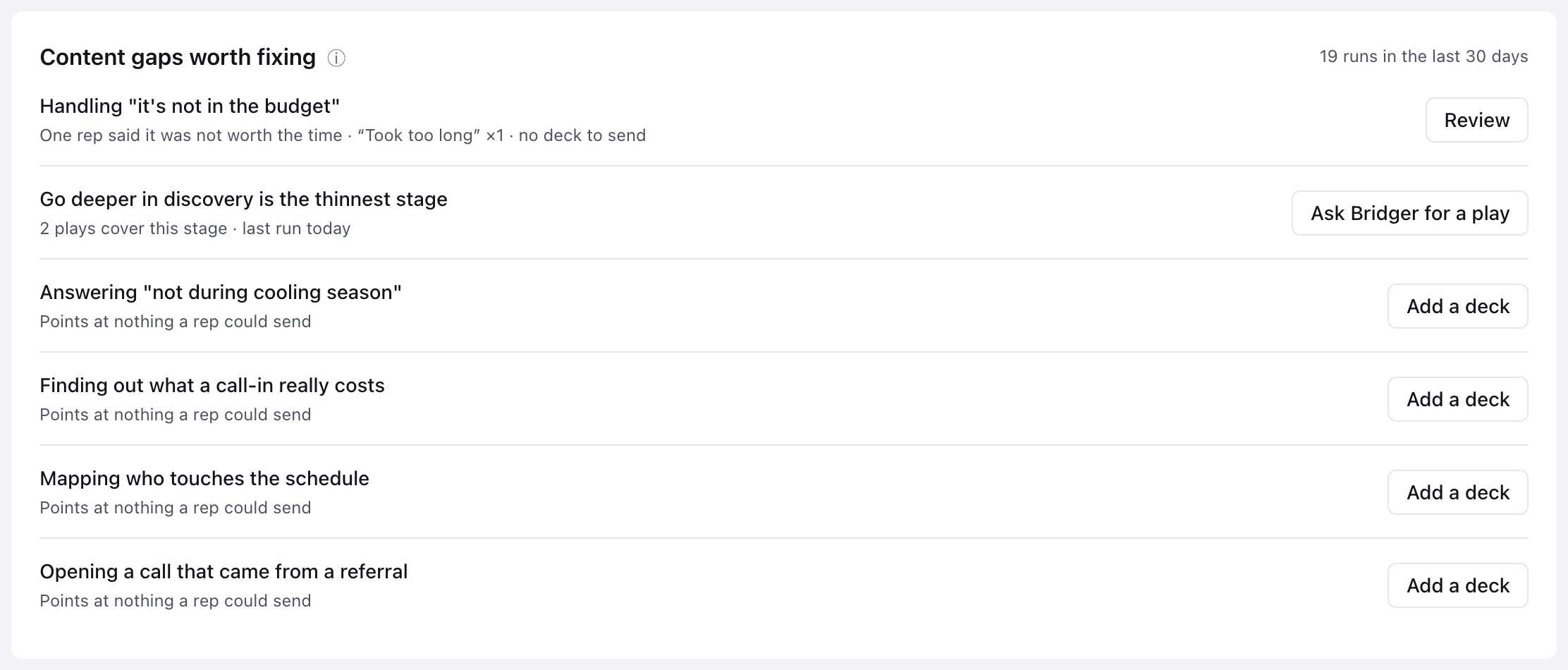
A play that is both skipped and has no deck shows once, with both reasons. The first six rows show; Show N more opens the rest. When the list is empty it reads Nothing needs fixing.
Why is nobody named in Content gaps worth fixing?
When reps rate a play, they are told it goes to the content, not to their manager. The list shows the play and the reasons, never who said it. Use it to decide which plays to rewrite.
Ask Bridger for a play opens a request to Bridger with the stage already named.
What is the Monday digest?
Three lines, sent every Monday about the week that just ended:
- How many of your learners practiced, and how many runs.
- Feedback on plays: how many were called not worth the time, and one anonymous note.
- When there is one, a play or stage worth a look.
It goes to every Learning manager in a workspace that has Sales Academy on and at least one published play, and it is sent even in a week when nobody practiced. Reps never get it. It never names who did or did not practice.
Press Monday digest at the top of Sales plays per week to preview what it would say for the week so far, in a window titled Monday morning. If the button reads Monday digest — off, you have turned it off.
How do I turn the digest on or off?
- Open Settings and choose My profile.
- Under notifications, switch Monday practice digest on or off.
It is on by default. The switch shows only to Learning managers, the only people the digest is sent to. A Workspace owner or Editor who has stepped down as Learning manager doesn't see it.
Related
- How do I assign a path to my team?
- A rep isn't showing as complete
- Which Sales Academy events send an email or Slack message?
This did not answer your question? Email hello@bridgercreative.com.