Can I download my presentation as a PDF?
Yes, if Bridger has turned on PDF download for it. Owners and Editors select Download PDF from the presentation's ⋯ menu.
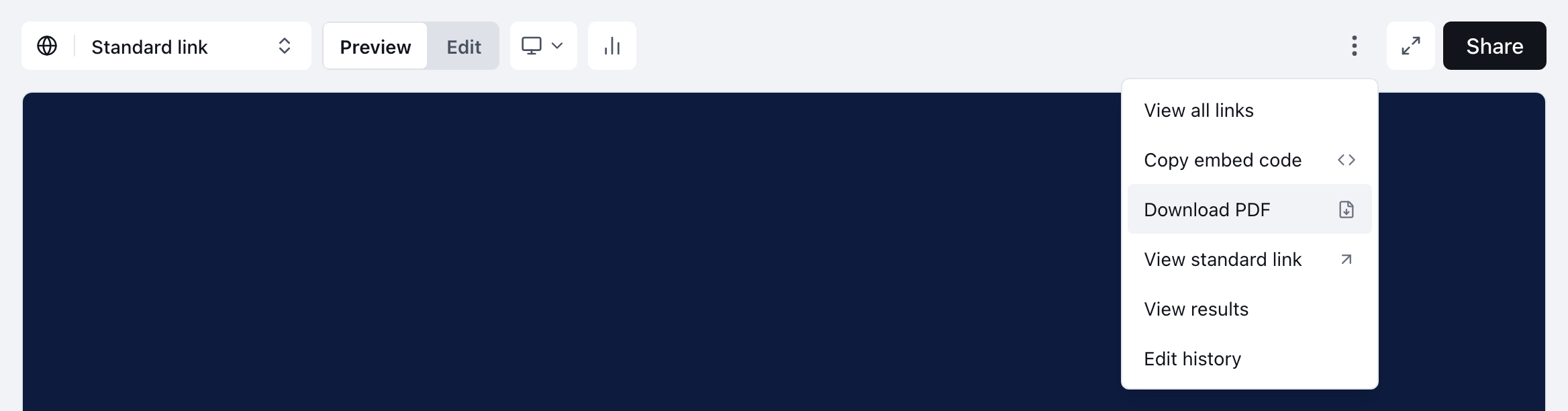
Yes, if Bridger has turned on PDF download for that presentation. Open the presentation, select the ⋯ menu beside Share, and choose Download PDF. You get one page per slide, and each page has a link back to the live presentation.
Who can download a PDF?
All of these have to be true:
- Bridger has turned on PDF download for this presentation. It's off until they do.
- The presentation's build can open on a specific slide. Most can. Older builds can't, and Bridger would need to rebuild it.
- You are a Workspace owner or Editor. Members don't get the option.
If Download PDF isn't in the ⋯ menu, one of those isn't true. Ask your Bridger team through Get Help.
PDF download is limited to Owners and Editors because a PDF is a copy that can't be tracked or taken back. Once it's sent, you can't see who opens it and you can't revoke it.
How do I download it?
- Open the presentation from Library.
- To get the PDF of a personalized link, select that link in the link selector at the top left first. Otherwise leave it on Standard link.
- Select the ⋯ menu beside Share.
- Choose Download PDF.
If a PDF of that version already exists, it downloads almost at once. Otherwise you'll see Preparing your PDF and This can take up to a minute. It will download when it's ready. The menu item reads Preparing PDF… while it works, and Your PDF is ready appears when the download starts.
What's in the PDF?
- One page per visible slide, in the order that link shows them. Pages you've hidden aren't included.
- That link's content. A personalized link's PDF has that recipient's wording and images.
- A link on every page to View the interactive version. On the standard link it opens your own standard link, so a visit from the PDF shows up in Insights as yours. On a personalized link it opens that recipient's link.
Interactive parts print as they first appear. A card that flips or a tooltip that opens on hover shows its starting state, and forms and booking steps can't be filled in from a PDF. Send the link when you need responses back.
Why couldn't my PDF be made?
The error says which case you've hit:
| Message | What it means |
|---|---|
| This deck's build can't open on a specific slide, so it can't be printed yet. | The presentation needs a newer build from Bridger |
| This link has no visible slides. | Every page is hidden on the selected link |
| Only workspace owners and editors can download this deck. | Your role changed to Member after the page loaded |
| PDFs are limited to 40 slides | The link shows more than 40 pages. Hide some, or ask Bridger |
| Today's PDF allowance is used up. Try again tomorrow. | A daily limit on PDF making has been reached |
| The last attempt to make this PDF failed. Try again in a couple of minutes. | A recent try failed. Wait, then try again |
| It's taking longer than expected. Try again in a few minutes. | It didn't finish in time. Try again shortly |
This did not answer your question? Email hello@bridgercreative.com.